Moody Neon City with Sky Whale
A cinematic AI prompt for a wide shot of a woman on a glass balcony overlooking a neon city, with a massive whale swimming in an ocean tunnel in the sky, bathed in deep blue and cyan light.
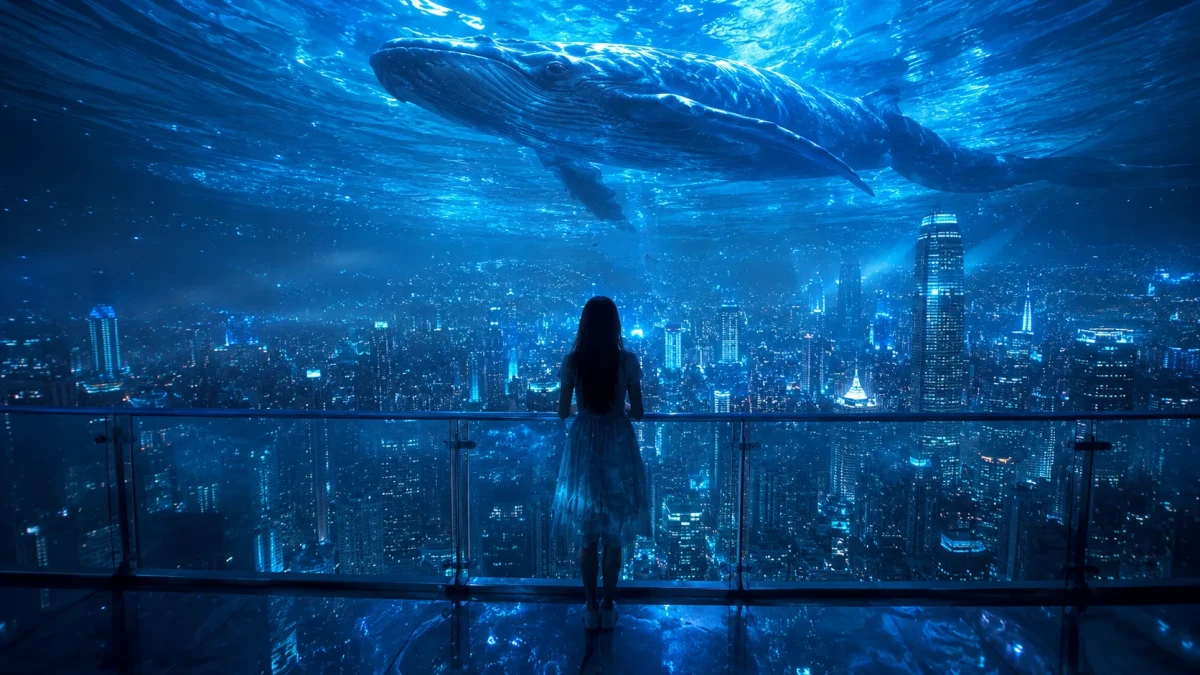
A breathtaking, live-action cinematic wide shot of a young woman seen from behind, standing on a high-altitude glass balcony and overlooking a monumental, dense metropolis glowing in deep cyan and teal neon. The sky above is a surreal, physics-defying marvel: a massive, curved tunnel of clear ocean water hanging overhead. Gliding gracefully inside this liquid sky is a gargantuan, majestic whale, its colossal body casting a soft shadow over the city. The entire scene is captured in a moody, monochromatic deep blue and cyan color palette. Vibrant bioluminescent specks and glowing particles drift through the misty air like floating stars. Shimmering, moving water caustics and light reflections ripple across the sleek skyscrapers and the woman's silhouette, creating an overwhelming, awe-inspiring sense of dramatic scale and cinematic magic.
Guide & Practical Tips
How to use this prompt
This prompt is designed for GPT Image 2. Use natural language as provided. The scene is highly specific, so keep the core elements fixed: the woman from behind, the glass balcony, the neon city, the ocean tunnel, and the whale. You can adjust small details like the woman's clothing color or the intensity of the neon glow. For best results, avoid adding conflicting elements like a bright sunny sky or multiple characters.
Best use cases
This prompt is ideal for:
- Concept art for sci-fi or fantasy films
- Book covers or game splash screens
- Social media posts with a surreal, awe-inspiring vibe
- Wallpaper or background art for personal projects
What to adjust
- Color palette: If you prefer warmer tones, change "deep blue and cyan" to "golden amber and pink." For a darker mood, specify "almost black with faint cyan highlights."
- Lighting: Increase the contrast by adding "harsh rim light from the city" or soften it with "diffuse ambient glow from the ocean tunnel."
- Composition: Change the aspect ratio from 16:9 to 9:16 for vertical orientation (e.g., phone wallpaper). Specify "closer to the woman" for a more personal feel.
Common mistakes
- Overcrowding: Do not add extra objects like birds, spaceships, or multiple whales. The magic lies in the simplicity and scale.
- Literal interpretation of metaphors: Avoid abstract phrases like "a sky of water" – instead, describe it as "a curved tunnel of clear ocean water hanging overhead."
- Ignoring lighting consistency: Ensure the whale's shadow and the caustics align with the light source (the glowing city below).
Variations
- Cyberpunk version: Add flying cars, holographic billboards, and a more dystopian atmosphere with red and cyan neon.
- Underwater version: Instead of a city, place the woman on a glass balcony overlooking a deep ocean trench with bioluminescent creatures.
- Minimalist version: Remove the whale and keep only the ocean tunnel, focusing on the woman's silhouette against the shimmering caustics.
- Daytime version: Change the setting to a misty dawn with soft golden light, and transform the whale into a cloud-like creature.
You might also like

Lone Rider in Amber Apocalypse
Nano Banana
Neural Underground: Cinematic Data Broker
Nano Banana
Dark Fantasy Knight with Neon Halo
GPT Image 2
Sultry 1970s Pool Hall Film Still
GPT Image 2
1970s NYC Solitary Figure Cinematic
GPT Image 2
Avant-Garde Extraterrestrial Portrait with Crystal Headpiece
GPT Image 2
Opulent Baroque Perfume Still Life Prompt
GPT Image 2