Gothic Cathedral Volumetric Light Prompt
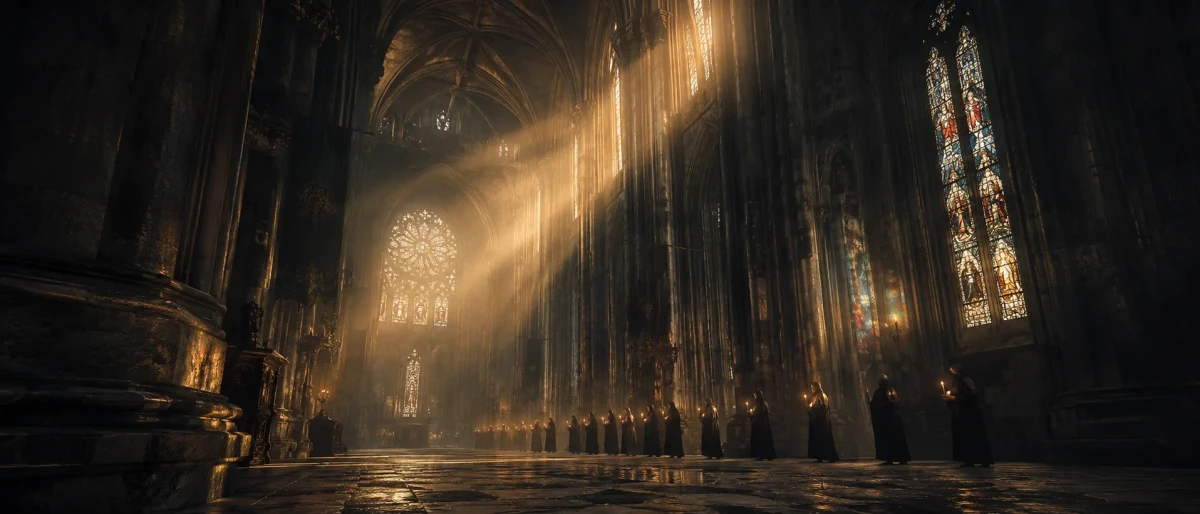
A cinematic wide shot inside a Gothic cathedral with dramatic volumetric golden sunlight, mist, and a distant procession. Perfect for spiritual, epic, or historical AI visuals.
Prompt Body
An awe-inspiring, epic cinematic wide shot from a low angle inside a colossal, ancient Gothic cathedral. Towering stone columns and majestic ribbed vaulted arches stretch high into the dark, misty ceiling. Far in the distance, a small, quiet procession of robed figures holding glowing candles slowly winds through the massive hall, their tiny flames twinkling like stars. Heavy, dramatic beams of volumetric golden sunlight pierce through high, colorful stained-glass windows, cutting through the dense, hazy air and illuminating swirling dust motes. The atmosphere is deeply spiritual and mysterious, painted in a beautiful contrast of cold slate-grey stone shadows and rich, warm amber light. The entire scene has a breathtaking, painterly quality with soft film grain, capturing a powerful sense of timelessness and immense scale.
Rate this prompt:
Guide & Practical Tips
How to use this prompt
This prompt is designed for GPT Image 2 and works best with natural language scene descriptions. Simply copy the full prompt into the image generator and run it. The key elements – low angle, volumetric light, stained glass, mist, and a distant procession – are all described in a coherent narrative style that the model handles well. For best results, avoid adding extra technical tags or overwriting the atmosphere. If you need to adjust the scene, modify the sentence describing the procession or the lighting conditions.
Best use cases
- Concept art for fantasy or historical settings – the cathedral evokes a sense of timeless grandeur.
- Book covers or album art – the spiritual and mysterious mood fits epic or ambient themes.
- Social media posts – a stunning visual for Instagram, Pinterest, or Twitter to capture attention.
- Wallpapers or background images – the wide composition works well for desktops or hero sections.
What to adjust
- Subject: Replace the procession with a lone figure, a choir, or leave the hall empty for pure architecture.
- Lighting: Change “golden hour” to “moonlight” or “stormy twilight” for a darker mood.
- Color palette: Swap “cold slate-grey and warm amber” for “icy blue and silver” or “crimson and gold”.
- Camera angle: Use “eye-level” or “high angle” to change the sense of scale.
- Aspect ratio: Default to 16:9 for cinematic stills, or 4:5 for social feeds.
Common mistakes
- Adding generic filler – phrases like “8k, masterpiece, ultra detailed” can distract GPT Image 2. Stick to descriptive, natural language.
- Overloading the scene – including too many distinct elements (e.g., multiple groups, animals, weather effects) may clutter the image. Keep the focus on the core atmosphere.
- Ignoring the mood – the emotional tone is crucial. If you want a more hopeful scene, add warmer colors and a brighter sky through the windows.
Variations
- Darker version: Replace golden sunlight with cold moonlight, add more shadows, and change the procession to a single hooded figure.
- Minimalist version: Remove the procession entirely and focus on the architecture with a single beam of light piercing the darkness.
- Fantasy version: Add glowing runes on the pillars, floating orbs, or ethereal spirits in the air.
- Ruin version: Show the cathedral partially collapsed, with vines and rubble, and a lone traveler exploring.
You might also like

Avant-Garde Extraterrestrial Portrait with Crystal Headpiece
GPT Image 2
Surreal Golden Hour Duck Ocean Cinematic Still
GPT Image 2
Dark Romantic Top-Down Portrait
Nano Banana
Sultry 1970s Pool Hall Film Still
GPT Image 2
1970s NYC Solitary Figure Cinematic
GPT Image 2
Opulent Baroque Perfume Still Life Prompt
GPT Image 2
Lone Rider in Amber Apocalypse
Nano Banana