Apocalyptic Rooftop Cinematic Still
A cinematic AI prompt for a woman silhouetted on a rooftop watching a nuclear explosion, with dramatic lighting and film grain.
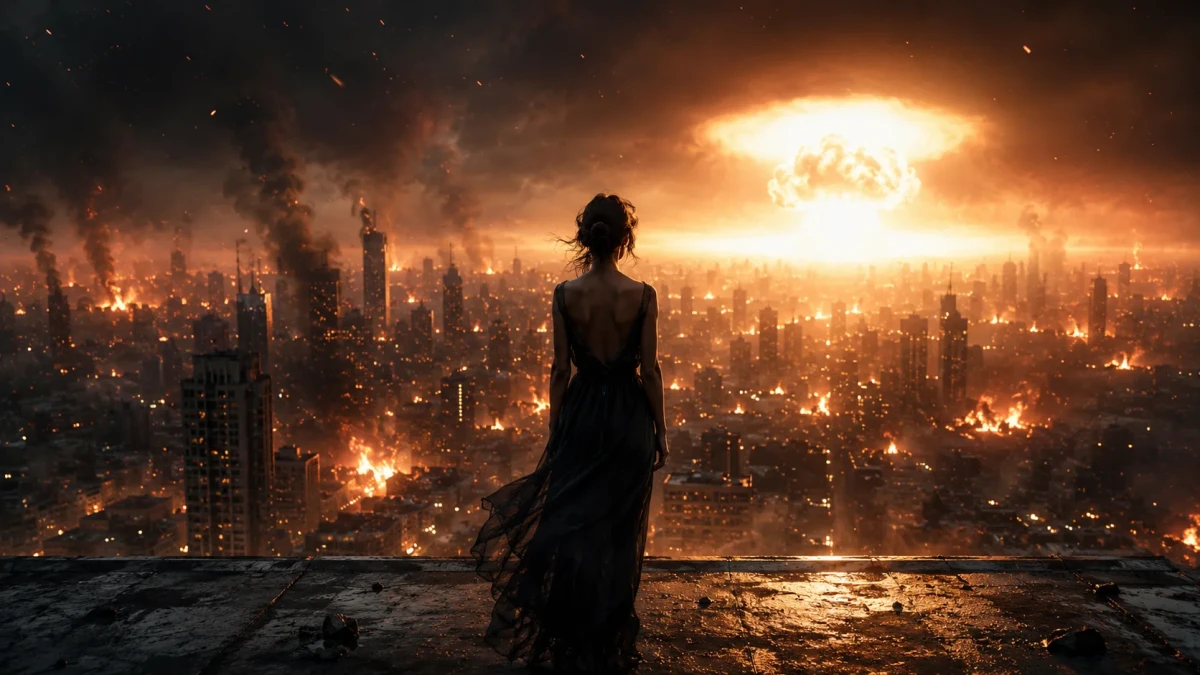
A deeply poetic and awe-inspiring cinematic wide shot from a high-altitude rooftop, capturing a beautiful woman standing calmly and completely relaxed at the very edge of a weathered concrete ledge. Viewed from behind and centered in the frame, she quietly watches a colossal, escalating nuclear catastrophe unfold below. The vast metropolis is erupting in fire, with towering skyscrapers burning through heavy smoke, culminating in a blinding, white-hot thermonuclear blast starting to erupt on the distant horizon. Captured on a premium Panavision Millennium DXL2 with a 35mm anamorphic lens at a wide-open T1.4 aperture, the violent city explosions are transformed into soft, warm, abstract bokeh, keeping her still silhouette and the wet concrete edge sharply defined. The lighting is highly dramatic: the blistering golden-orange glow of the nuclear blast acts as a massive key light, wrapping her in a warm, hazy glow, while a cool blue-gray rim light outlines her figure against the dark, smoky sky. The air is thick with swirling embers, rising heat waves, and drifting ash, creating a tragically beautiful, somber, and contemplative atmosphere with soft film grain and rich cinematic textures.
Guide & Practical Tips
How to use this prompt
This prompt is designed for GPT Image 2 and works best when entered as a single, natural-language description. Keep the key visual elements—shot size, lighting mood, and atmosphere—fixed. You can change the subject's appearance, the city style, or the color palette. For best results, avoid adding extra technical terms like "8k" or "masterpiece"; the model responds better to descriptive language.
Best use cases
This visual solution is ideal for creating:
- Cinematic stills for film or game concept art
- Dramatic social media posts (Instagram, Twitter banners)
- Album covers or editorial illustrations with a dark, epic tone
- Background visuals for storytelling or mood boards
The 2.39:1 aspect ratio (or 16:9) enhances the cinematic feel.
What to adjust
- Subject: Replace the woman with a man, a character from your story, or even a child. Describe their posture and clothing.
- Location: Change the city to a specific real or fictional metropolis (e.g., "Tokyo skyline" or "Gotham City").
- Lighting: Shift the blast color from orange-blue to green-purple for a sci-fi twist.
- Atmosphere: Add fog, rain, or snow by describing them in the prompt.
- Composition: Try a closer shot or a low angle to increase tension.
Common mistakes
- Overloading with conflicting instructions: Don't mix "close-up" with "wide shot" in the same prompt.
- Using abstract emotions: Avoid "sad woman" – instead describe her posture and the scene.
- Neglecting lighting: The dramatic contrast between the warm blast and cool rim light is crucial; don't omit it.
- Adding filler words: "Ultra realistic" or "masterpiece" can dilute the prompt.
Variations
- Darker version: Remove the rim light and increase smoke density for a more oppressive mood.
- Minimalist version: Strip the city to a few silhouetted buildings and let the blast dominate.
- Futuristic version: Replace the concrete ledge with a neon-lit rooftop and add holographic elements.
- Documentary style: Describe the scene as a photojournalist's capture, with handheld camera feel and less film grain.
You might also like
Desperate Run Through Flower Field at Twilight
GPT Image 2
Lone Rider in Amber Apocalypse
Nano Banana
Sultry 1970s Pool Hall Film Still
GPT Image 2
Red Tape Mummy – A Surreal Corporate Portrait
GPT Image 2
Android's Post-Apocalyptic Birthday Ritual
GPT Image 2
Surreal Golden Hour Duck Ocean Cinematic Still
GPT Image 2
Vintage Hovercraft Crash AI Prompt
Nano Banana