Grunge Fashion Portrait with Chains and Headphones
A moody, cinematic close-up portrait of a pale fashion model with silver chains wrapped around her face, wearing DJ headphones, dark grunge makeup, and an aggressive gaze. Shot with an ARRI Alexa 65 and Panavision lenses for a hyper-realistic, film-like look.
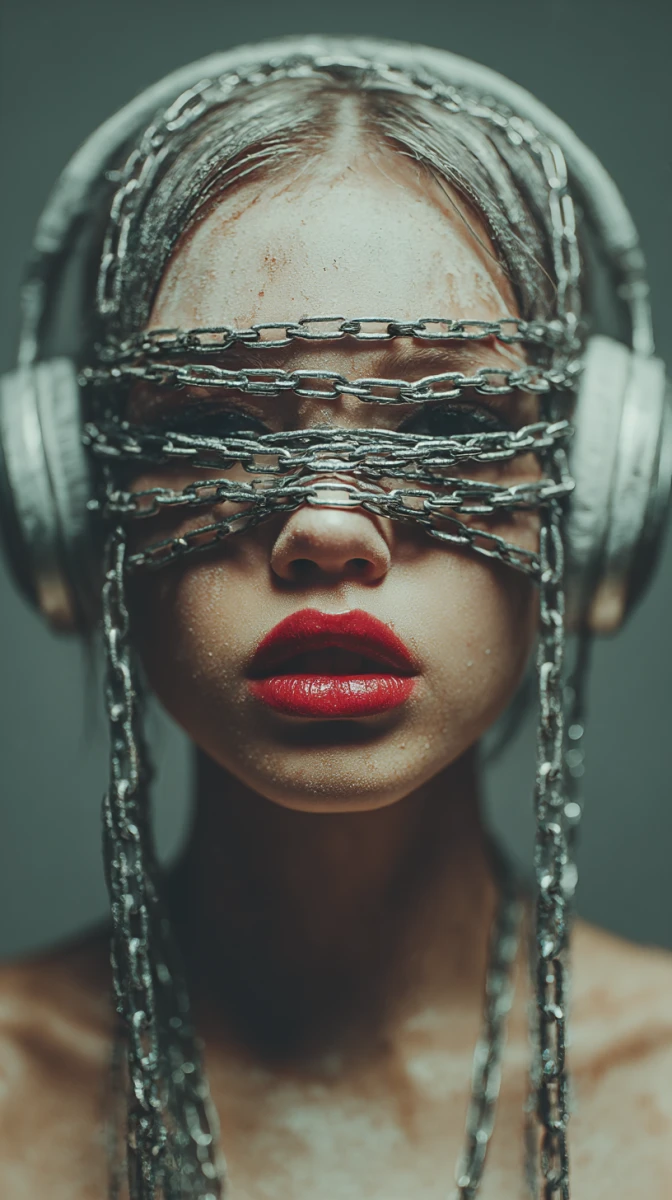
Close-up portrait of a gorgeous pale fashion model, heavy silver metal chains wrapped tightly around her eyes and face, wearing bulky silver modern DJ headphones, dark grunge makeup, glossy blood-red lips, confident aggressive gaze. Dim moody studio lighting, dark grey background. Shot on ARRI Alexa 65, IMAX 70mm format, Panavision Master Prime lenses, f/1.4 aperture, cinematic depth of field, Dolby Vision HDR color grading, Netflix original aesthetic, 8k resolution, extreme micro-details, hyper-realistic skin textures

--ar 9:16
--raw
--v 7
--stylize 200
Guide & Practical Tips
How to use this prompt
This prompt is designed for Midjourney version 7 with the --ar 9:16 aspect ratio for vertical portraits, ideal for social media stories or phone wallpapers. Use --raw to reduce Midjourney's default stylization and get more realistic textures, and --stylize 200 to add subtle artistic flair without overwhelming the subject. Keep the subject description intact; you can change the model's features (hair color, skin tone, makeup color) while preserving the structural elements like chains, headphones, and lighting.
Best use cases
This prompt works excellently for album covers, music artist promotional images, fashion editorial concepts, and dark aesthetic social media posts. The 9:16 format makes it perfect for Instagram Reels, TikTok covers, or Spotify canvas art. The aggressive, attitude-filled expression suits genres like industrial, metal, or techno music visuals.
What to adjust
You can modify the model's appearance: change hair color to blonde or blue, alter makeup from dark grunge to gold glitter, or swap the silver chains for black leather straps. Adjust the --stylize value (try 150 for more realism or 300 for more painterly effect). To change the background, replace "dark grey background" with a specific scene like "neon-lit alley" or "high-tech studio". For a wider shot, remove the close-up description and adjust framing.
Common mistakes
- Overloading with too many film references: the prompt already includes many technical terms like "ARRI Alexa 65" and "IMAX 70mm". Some models like Midjourney may interpret these as style cues but can sometimes dilute the focus. Stick to the core visual elements. 2. Using
--ar 9:16and then expecting a horizontal crop—stay within vertical framing. 3. Ignoring the--rawparameter: if you omit it, Midjourney may add unwanted stylization that reduces the gritty feel. 4. Changing the lighting description: removing "dim moody studio lighting" can lead to flat results.
Variations
- Warmer tone: Replace "dim moody studio lighting" with "warm golden hour lighting" and change silver chains to gold.
- Cyberpunk version: Change the background to "neon-drenched cyberpunk alley, rain reflections" and add glowing elements.
- Minimalist: Remove the headphones and chains for a cleaner beauty shot.
- Editorial fashion: Alter makeup to bold red lipstick only, and use a white background with soft fill light.
- Composite scene: Keep the face but change the headphone brand to vintage for a retro twist.
You might also like
Cyber-Baroque Ethereal Portrait with Crystal Veil
Nano Banana
Avant-Garde Extraterrestrial Portrait with Crystal Headpiece
GPT Image 2
Surreal Black-and-White Cinematic Portrait – Birds from Void
GPT Image 2
Sultry 1970s Pool Hall Film Still
GPT Image 2
Cinematic Red Fashion Portrait with Hat
Nano Banana
Moody Minimalist Fashion Portrait with Red Dress
Nano Banana
Vintage Noir Train Portrait
Nano Banana